

How to Play the Transformers TCG
New to the Transformers TCG? This page covers what you need to start playing, where to get cards, and the complete basic rules of the game. The rules below are the standard player-supplied rules text, originally provided by Wizards of the Coast and preserved by the Aequitas committee, the community rules body that operated from 2020–2022. For full detail beyond this overview, see our complete rules.
What You Need to Play
To play a game of the Transformers TCG, you need:
- a team of Transformers character cards, built to a 25-star limit,
- a battle deck of at least 40 battle cards,
- damage counters or dice to track damage on your characters,
- and a flat surface to play on.
Each player brings their own team and deck. Everything on this list is explained in detail below.
Start Here
New to the game? Start with a Goodies Starter Deck, the annual starter product designed as the entry point into the current game. Professionally printed decks are available from the Donation Storefront. Once you have a deck, see Formats for which format to play.
Want to print your own? Every transformerstcg.org release is also free through Downloads. Print-and-play cards are fully supported in casual and organized play, so buying cards is never required.
Coming back after time away? The Jumpstarter Update Booster collects the community-era replacement cards into a single release, so you can bring an older collection up to date in one go, in print or as a download. See Returning Players for the rest of what’s changed.
Want to play online? The transformerstcg.org Tabletop Simulator table includes official-era cards, supported community releases, and a selection of historical fan material, with no physical cards required.
Looking for other players? Our Events page lists in-person and online organized play, and the Discord community is where day-to-day games get scheduled.
Building a Team and Deck
All character cards and some battle cards have a number of stars near the bottom of the cards. Make sure the total number of stars on your character cards and battle cards combined is 25 or less. As long as you don’t go over the 25-star limit, you can have as many characters on your team as you want. You can’t have more than 1 of each unique character (based on its full card name) on your team.
You’ll also need a deck of at least 40 battle cards. Types of battle cards include Action cards and Upgrade cards. You can’t have more than 3 of the same battle card in your deck.
Winning the Game
When your opponent’s characters are all KO’d (knocked out), you win!
Getting Started
- Most characters have 2 modes: alt mode and bot mode. Put your character cards on your side of the battlefield in alt mode (or alt 1 mode). The mode that’s face up tells you a character’s current stats and abilities.
- Shuffle your deck of battle cards. Put it face down off to the side.
- Randomly decide who goes first. Switch who goes first for each new game.
- Each player draws 3 battle cards. To draw a card, put the top card of your deck into your hand.
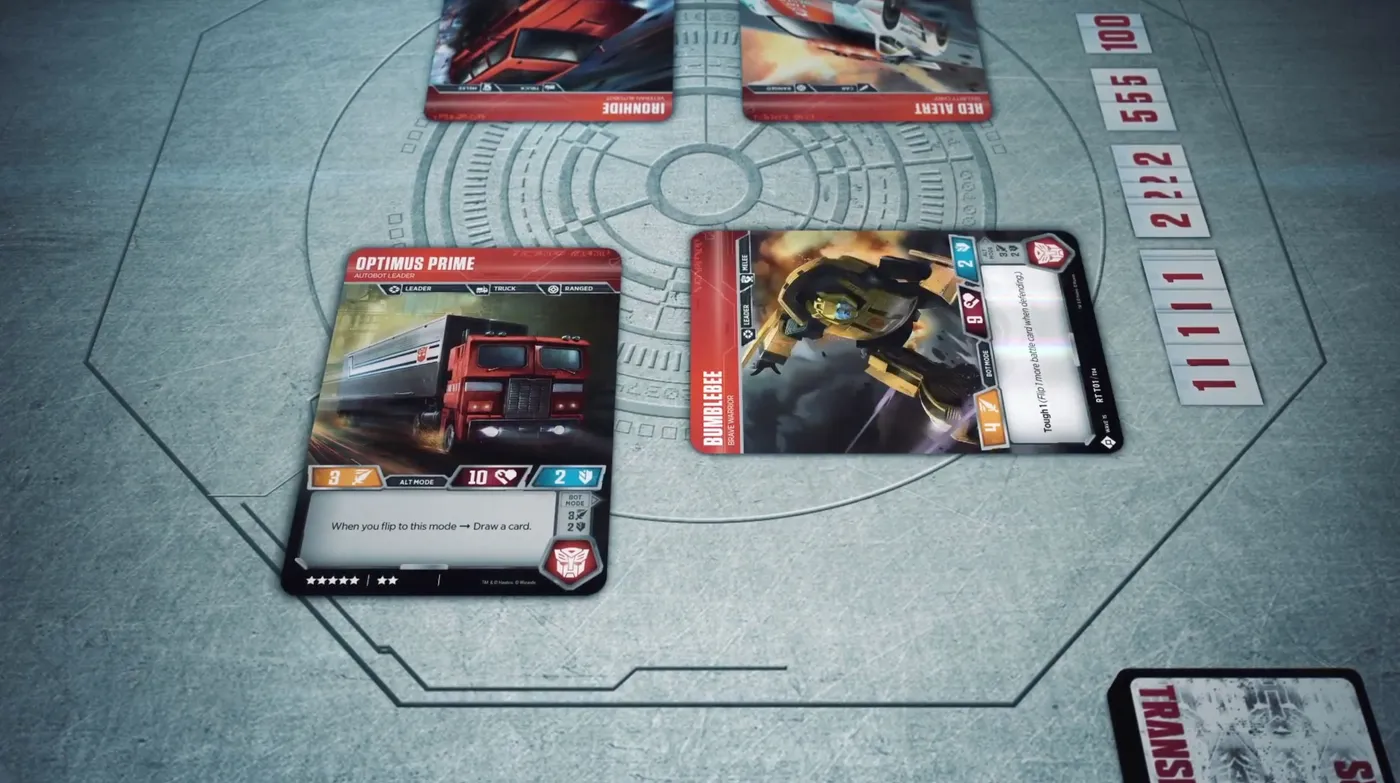
Tapping and Untapping Characters
If you’re told to tap one of your characters, turn it sideways. To untap it, turn it back so it’s upright and facing you. Attacking will cause your characters to become tapped. Some cards can also tap or untap characters.
Taking a Turn
At the start of your turn, draw a battle card. Then you can do the following in any order:
- Flip 1 of your characters on the battlefield or in your KO area to its other mode.
- Play 1 Action card from your hand.
- Play 1 Upgrade card from your hand onto one of your characters.
- Use 1 Tap ability of one of your characters.
Exception: on the very first turn of the game, the player who goes first can’t play Actions or Upgrades. On the second turn, the other player can play only one card, either an Action or an Upgrade.
When you play an Action, do what the card says and then set it off to the side. You’ll put it into your scrap pile at the end of the turn. Your scrap pile sits next to your deck of battle cards and is where your used battle cards go during the game. If you’re told to scrap a card, put it there.
A Secret Action is an Action you play face down; it uses your Action for the turn like any other. Reveal it when it says to reveal it, then use its ability. Put it into your scrap pile at the start of your next turn.
A Rolling Action is an Action you play tapped; it uses your Action for the turn like any other. It stays on the battlefield instead of going to your scrap pile at the end of the turn, and its abilities don’t work while it’s tapped. Untap it at the beginning of your next turn. When its Scrap ability says you may scrap it, usually when one of your characters attacks or defends, you can scrap it to use its When Scrapped ability.
An Upgrade stays on the battlefield attached to a character. There are 3 kinds of Upgrades: Weapons, Armor, and Utilities. Each character can have up to 1 of each kind. If you want to play an Upgrade on a character that already has one of that kind, scrap the old one.
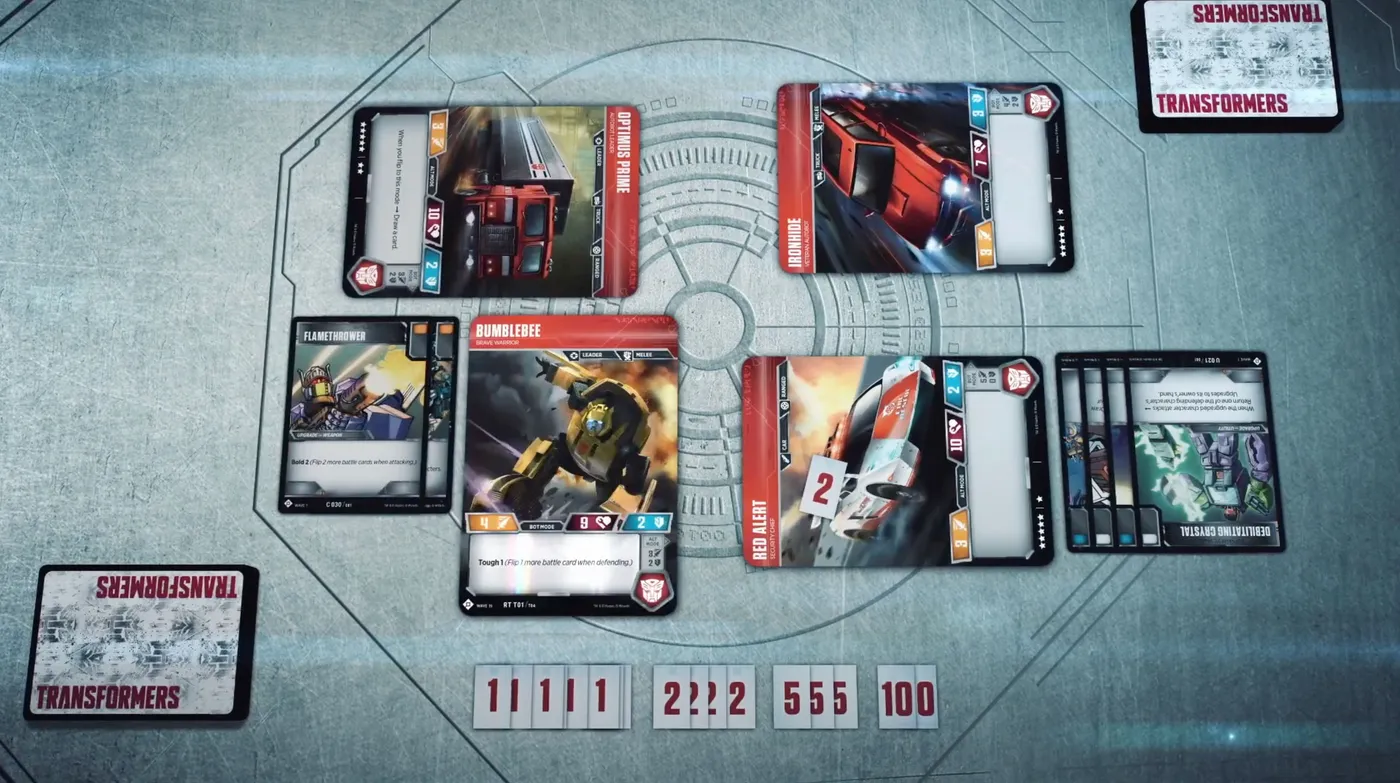
Attack
Next, it’s time to attack!
- Choose one of your untapped characters as the attacker.
- Choose one of your opponent’s tapped characters as the defender. If none of your opponent’s characters are tapped, your character can attack any of them.
- Tap your attacker.
- Each player flips over the top 2 battle cards of their deck and sets them aside. If a player flips any ⬜️ battle icons, that player flips 2 more cards. This bonus flip happens only once per player on each attack.
- For the attacker, count the number of ⬛️ battle icons flipped. The attacker gets Pierce 1 until end of battle for each of them. Pierce numbers add together.
- For the attacker, count the number of 🟧 attack battle icons flipped and add that to its Attack.
- For the defender, count the number of 🟦 defense battle icons flipped and add that to its Defense.
- If the total Attack number is higher than the total Defense number, the attacker does damage to the defender equal to the difference. If the numbers are the same or the total Defense number is higher, no damage is done. However, an attacker that has Pierce does at least as much damage as its total Pierce number, but not more than its total Attack number.
Some cards may affect how characters attack and defend. For example, a character’s ability may allow a player to flip more cards when that character attacks or defends.
After the attack, each player who flipped at least one card with a 🟩 battle icon may swap a card from their hand with one of their flipped 🟩 battle icon cards.
Then, if your opponent has any untapped characters, your turn is over. If your opponent’s characters are all tapped, you can attack with a character again, but only if at least one of your characters is untapped. Keep attacking with your characters until all of them are tapped. Once all characters on both sides are tapped, untap them all and your turn is over.
When your turn ends, put all battle cards you flipped for attacks during that turn into your scrap pile. Also put any Actions you played that turn into your scrap pile.
Damage and Knockout
When something does damage to a character, put that many damage counters on it. If the number of damage counters it has equals or is more than its Health, the character is KO’d.
Move it off the battlefield to your KO area. Its abilities stop working, but you can still flip a KO’d character to its other mode during your turn.
Reshuffling Your Deck
If your deck ever runs out of battle cards, shuffle the cards in your scrap pile face down. Those shuffled cards become your deck. This can happen at any time, even in the middle of an attack!
Learn More
For turn-phase detail, triggered abilities, keyword stacking, and official errata, see our complete rules. Check out our FAQ for common questions, or join the Discord community to ask other players directly. To play without printing anything, or over webcam with the cards you have, see Play Online.
How to Play Videos
Looking for a visual walkthrough? These videos teach the basics for your first game. Press play to watch here, or open a title to see the video on its own page.
-
How to Play the Transformer TCG!
Wossy Plays: How to Play the Transformer TCG!
Wossy Plays Aug 14, 2018 -
Transformers TCG Animated How to Play - Video 1 | Transformers HQ
transformerstcg.com: Animated How to Play: Video 1
transformerstcg.com Sep 7, 2018 -
Transformers TCG Animated How to Play - Video 2 | Transformers HQ
transformerstcg.com: Animated How to Play: Video 2
transformerstcg.com Sep 7, 2018 -
Transformers TCG Animated How to Play - Video 3 | Transformers HQ
transformerstcg.com: Animated How to Play: Video 3
transformerstcg.com Sep 7, 2018 -
-
Learning Transformers | Gameplay Tutorial with Rules Explained
Learning Transformers: Gameplay Tutorial with Rules
Team Covenant Oct 4, 2018 -
Transformers TCG: Learn to play Part 1 (basics)
Powered by Primus: Learn to play Part 1 (basics)
Powered by Primus Jan 14, 2019 -
How to Play The Transformers Trading Card Game - Part 1: The Basics
Wreck 'n Rule: How to Play: Part 1: The Basics
Wreck 'n Rule May 8, 2019 -
How to Play The Transformers Trading Card Game - Part 2: A Basic Game
Wreck 'n Rule: How to Play: Part 2: A Basic Game
Wreck 'n Rule May 8, 2019 -
How to Play The Transformers Trading Card Game - Part 3: Advanced Plays
Wreck 'n Rule: How to Play: Part 3: Advanced Plays
Wreck 'n Rule May 27, 2019 -
How to Play the TFTCG with Vangelus and TFcon Pack 2!
How to Play the TFTCG with Vangelus and TFcon Pack 2!
Vangelus Mar 9, 2026